REST-API - Entwicklerhandbuch
vhs.Connect – REST-API Entwickler-Einleitung
Diese Dokumentation bietet einen praxisnahen Überblick über die wichtigsten API-Abläufe für die Integration von Kursverwaltung und Warenkorb.
Alle Beispiele verwenden die Basis-URL:
https://api.vhs-connect.de
Die Endpunkte sind dem offiziellen Swagger-Schema entnommen.
Authentifizierung erfolgt per OAuth2-Client-Credentials-Flow.
Links
1) Authentifizierung (OAuth2 Client Credentials)
curl -X POST https://api.vhs-connect.de/connect/token \
  -H "Content-Type: application/x-www-form-urlencoded" \
  -d "grant_type=client_credentials" \
  -d "client_id=<CLIENT_ID>" \
  -d "client_secret=<CLIENT_SECRET>" \
  -d "scope=api"
Antwort:
{
  "access_token": "eyJhbGciOiJIUzI1NiIs...",
  "token_type": "Bearer",
  "expires_in": 3600
}
Jeder weitere Request muss den Header enthalten:
Authorization: Bearer <access_token>
2) Kurs-Suche
curl -X POST https://api.vhs-connect.de/api/gp/search \
  -H "Authorization: Bearer $TOKEN" \
  -H "Content-Type: application/json" \
  -d '{
        "searchString": "Yoga",
        "limit": 20,
        "page": 0
      }'
Antwort: Liste von Kursen mit IDs, Terminen, Gebühren etc.
3) Warenkorb – Grundlegender Ablauf
3.1 Neuen Warenkorb anlegen oder laden
Anlegen:
curl -X POST "https://api.vhs-connect.de/api/gp/cart" \
  -H "Authorization: Bearer $TOKEN"
Laden:
curl -X GET "https://api.vhs-connect.de/api/gp/cart/<CART_ID>" \
  -H "Authorization: Bearer $TOKEN"
3.2 Personen- und Teilnehmerdaten erfassen
Die Personendaten sind im UserAccount verankert und werden später im Warenkorb referenziert. Die UserAccountId ist im Warenkorb-Objekt enthalten.
a) Hauptperson (MainPerson) setzen oder aktualisieren
Endpoint: PUT /api/gp/users/{userAccountId}/mainPerson
Body: Person
Response: UserAccount
curl -X PUT "https://api.vhs-connect.de/api/gp/users/<USER_ACCOUNT_ID>/mainPerson" \
  -H "Authorization: Bearer $TOKEN" \
  -H "Content-Type: application/json" \
  -d '{
        "firstName": "Max",
        "lastName": "Mustermann",
        "birthDate": "1980-05-12",
        "gender": "m",
        "addresses": [{
          "street": "Musterweg 1",
          "zip": "12345",
          "city": "Musterstadt"
        }],
        "contacts": [{
          "type": "Email",
          "value": "max.mustermann@example.org"
        }]
      }'
Diese Person fungiert als zentrale Kundendatenbasis (Rechnungsempfänger, Standard-Teilnehmer).
b) Weitere Personen hinzufügen
Endpoint: POST /api/gp/users/{userAccountId}/persons
Body: Person
Response: UserAccount (aktualisierte Personenliste)
curl -X POST "https://api.vhs-connect.de/api/gp/users/<USER_ACCOUNT_ID>/persons" \
  -H "Authorization: Bearer $TOKEN" \
  -H "Content-Type: application/json" \
  -d '{
        "firstName": "Erika",
        "lastName": "Mustermann",
        "birthDate": "1985-08-20",
        "gender": "f"
      }'
Weitere Personen können im Warenkorb als Teilnehmer ( attendants ) referenziert werden.
c) Rechnungs- oder Teilnehmerdaten im Warenkorb setzen
Endpoint:
PUT /api/gp/cart/{shoppingCartId}/billingRecipient
curl -X PUT "https://api.vhs-connect.de/api/gp/cart/<CART_ID>/billingRecipient" \
  -H "Authorization: Bearer $TOKEN" \
  -H "Content-Type: application/json" \
  -d '{
        "billingRecipient": {
          "personId": "300-C-SF43502",
          "dbChangeAction": "Update"
        }
      }'
3.3 Kurs in den Warenkorb legen
curl -X POST "https://api.vhs-connect.de/api/gp/cart/<CART_ID>/items" \
  -H "Authorization: Bearer $TOKEN" \
  -H "Content-Type: application/json" \
  -d '{
        "courseId": "661-C-4143149",
        "quantity": 1
      }'
Entfernen eines Kurses:
curl -X DELETE "https://api.vhs-connect.de/api/gp/cart/<CART_ID>/items/661-C-4143149" \
  -H "Authorization: Bearer $TOKEN"
3.4 Zahlungsdaten festlegen
a) Bankkonto im UserAccount anlegen
Endpoint: POST /api/gp/users/{userAccountId}/banks
Body: BankAccountDto
Response: UserAccount (mit bankAccountId)
curl -X POST "https://api.vhs-connect.de/api/gp/users/<USER_ACCOUNT_ID>/banks" \
  -H "Authorization: Bearer $TOKEN" \
  -H "Content-Type: application/json" \
  -d '{
        "bankAccount": {
          "iban": "DE02120300000000202051",
          "bic": "BYLADEM1001",
          "accountHolderId": "<PERSON_ID_AUS_CART>"
        }
      }'
b) Zahlungsart im Warenkorb setzen
Endpoint: POST /api/gp/cart/{shoppingCartId}/paymentDetails
Body: PaymentDetails
Response: ShoppingCart
curl -X POST "https://api.vhs-connect.de/api/gp/cart/<CART_ID>/paymentDetails" \
  -H "Authorization: Bearer $TOKEN" \
  -H "Content-Type: application/json" \
  -d '{
        "paymentMethod": "Debit",
        "bankAccountId": "123456"
      }'
paymentMethod akzeptiert z. B. Debit, Banktransfer, Epayment.
Vorher muss das Bankkonto im UserAccount existieren.
3.5 Validierung & Checkout
Validierung:
curl -X POST "https://api.vhs-connect.de/api/gp/cart/<CART_ID>/validate" \
  -H "Authorization: Bearer $TOKEN"
Checkout:
curl -X POST "https://api.vhs-connect.de/api/gp/cart/<CART_ID>/checkout" \
  -H "Authorization: Bearer $TOKEN" \
  -H "Content-Type: application/json" \
  -d '{}'
4) UserAccount abrufen
curl -X GET "https://api.vhs-connect.de/api/gp/users/<USER_ACCOUNT_ID>" \
  -H "Authorization: Bearer $TOKEN"
Antwort enthält Personen, Bankkonten, Rechnungs- und Kontaktinformationen.
5) Mini-Flow (Überblick)
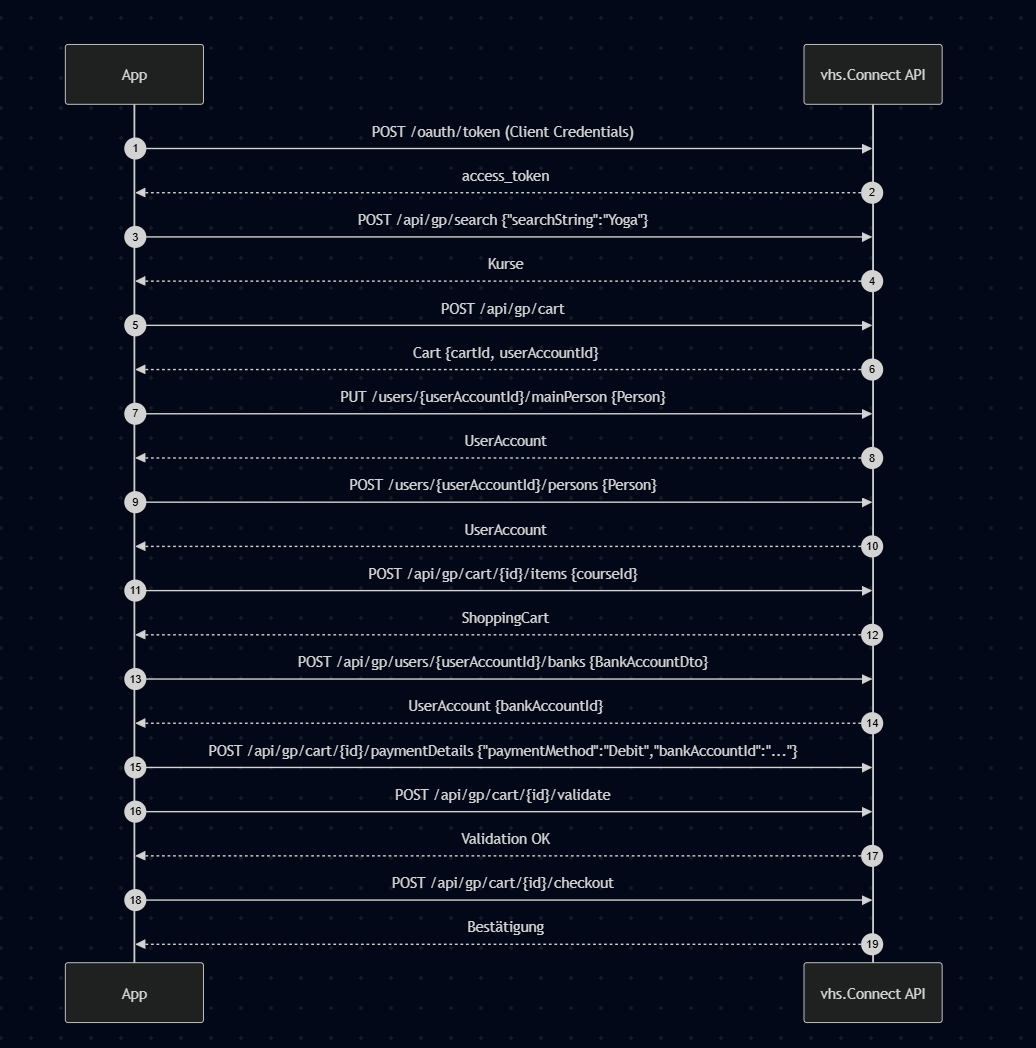 Abbildung 3.1: Screenshot zum beschriebenen Schritt.
6) Hinweise & Best Practices
- MainPerson ist Pflicht – muss vor Checkout vorhanden sein.
- BankAccount ist nur nötig bei paymentMethod=Debit.
- IDs sind GlobalIds (z. B. 300-C-SF43502).
- Fehlerobjekte: ErrorDTO oder ParameterizedErrorDTO mit error_description.
- E-Payment-Flow (paymentCreate, paymentExecute) wird hier nicht beschrieben.
- Health-Check:GET /api/gp/pingPreAuthGET /api/gp/pingSecured